UNIX Advanced System Programming - Files and directories

The UNIX file system is a hieararchical arrangement of directories and files. Everything starts with root ( / ).
A directory is a file that contains directory entries.
Logically we can think of each directory entry as containing a filename along with structure of information describing the attributes of file.
The attributes of file is smth like the name of file, the size of file, permissions of file, owner of the file and etc.
We can look the information of files or directories with the:
stat
function.
Its like that :
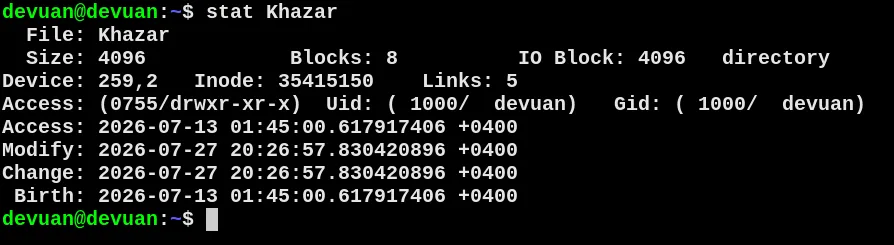
#Filenames
The names in a directory are called filenames.
We cant type "/" and null character as a filename.
Two filenames automatically created whenever a new directory is created :
. (dot) and . . (dot-dot). Dot refers current directory and dot-dot refers to the parent directory.
In the root directory dot-dot is same as dot. Today all commercial UNIX file systems support 255 character filenames.
#pathname
A sequence of one or more filenames, seperated by slashes and optionally starting with a slash, forms a - pathname.
You can see all the files and directories with 'ls' command.
If u want read about 'ls' just type " man ls "
#List all the files in a directory:
#include "apue.h"
#include <stdio.h>
#include <stdlib.h>
#include <dirent.h>

int main(int argc, char *argv[]){
	DIR *dp;
	struct dirent*dirp;
	if (argc != 2)
		err_quit("usage: ls directory_name");
	if ((dp = opendir(argv[1])) == NULL)
		err_sys("can't open %s", argv[1]);
	while ((dirp = readdir(dp)) != NULL)
		printf("%s\n", dirp->d_name);
closedir(dp)
exit(0);
}
#WorkingDirectory
Every process has a working directory, sometimes called the current working directory. This is the
directory from which all relative pathnames are interpreted. A process can change its working
directory with the chdir function
#HomeDir
When we log in, the working directory is set to our home directory. Our home directory is obtained
from our entry in the password file